Version 0.4.0Free and open source A fun project, built with modern AI tools

Open-source, self-hosted cutting-room software for garment factories

Pattern, marker, cut planning, rolls, spreading and bundles in one program. It runs on your own Windows PC or factory server and works offline. Your patterns never leave your factory.

  • No account
  • No cloud
  • No licence fee
  • Works offline

BETA is young and not perfect yet. We need your help to improve it. Tell us what to fix.

Illustration of a marker: shirt fronts, backs, sleeves, collars and pockets in three sizes nested on a strip of fabric. fabric width marker length: shorter is better SML
Illustration. A marker places every pattern piece on the fabric so the lay uses as little length as possible.
  • 8steps from pattern to sewing line, in one program
  • 300real Lectra nesting tasks in our public benchmark
  • 100%of markers checked by an independent validator before export
  • 0accounts, cloud services or licence fees

One program

From pattern to sewing line

One record follows the style through the cutting room. Each step uses the result of the step before, so numbers are not typed twice.

  1. Step 1

    Pattern

    Draft, grade and digitize patterns. Import DXF-AAMA or a supported Seamly2D file.

    BETA Pattern
  2. Step 2

    Marker

    Nest all pieces on the fabric width with grain, nap, pairs and size ratio. Edit by hand.

    BETA Marker
  3. Step 3

    Cut plan

    Turn an order into size ratios, ply heights and lay lengths.

    BETA Marker
  4. Step 4

    Rolls

    Inspect rolls (4-point), group shade and shrinkage, allocate rolls to lays.

    BETA Marker
  5. Step 5

    Spread

    Print spreading sheets with roll order, plies, splice zones and end allowances.

    Floor
  6. Step 6

    Cut

    Plot the marker 1:1 (PLT/HPGL or PDF) or send a cutter file. Track each lay.

    Floor
  7. Step 7

    Bundles

    Number plies, make bundles and print QR tickets and stickers. Plan re-cuts.

    Floor
  8. Step 8

    Sewing

    Scan bundles out to sewing lines. Export work-in-progress and fabric use.

    Floor

Screenshots

See the real app

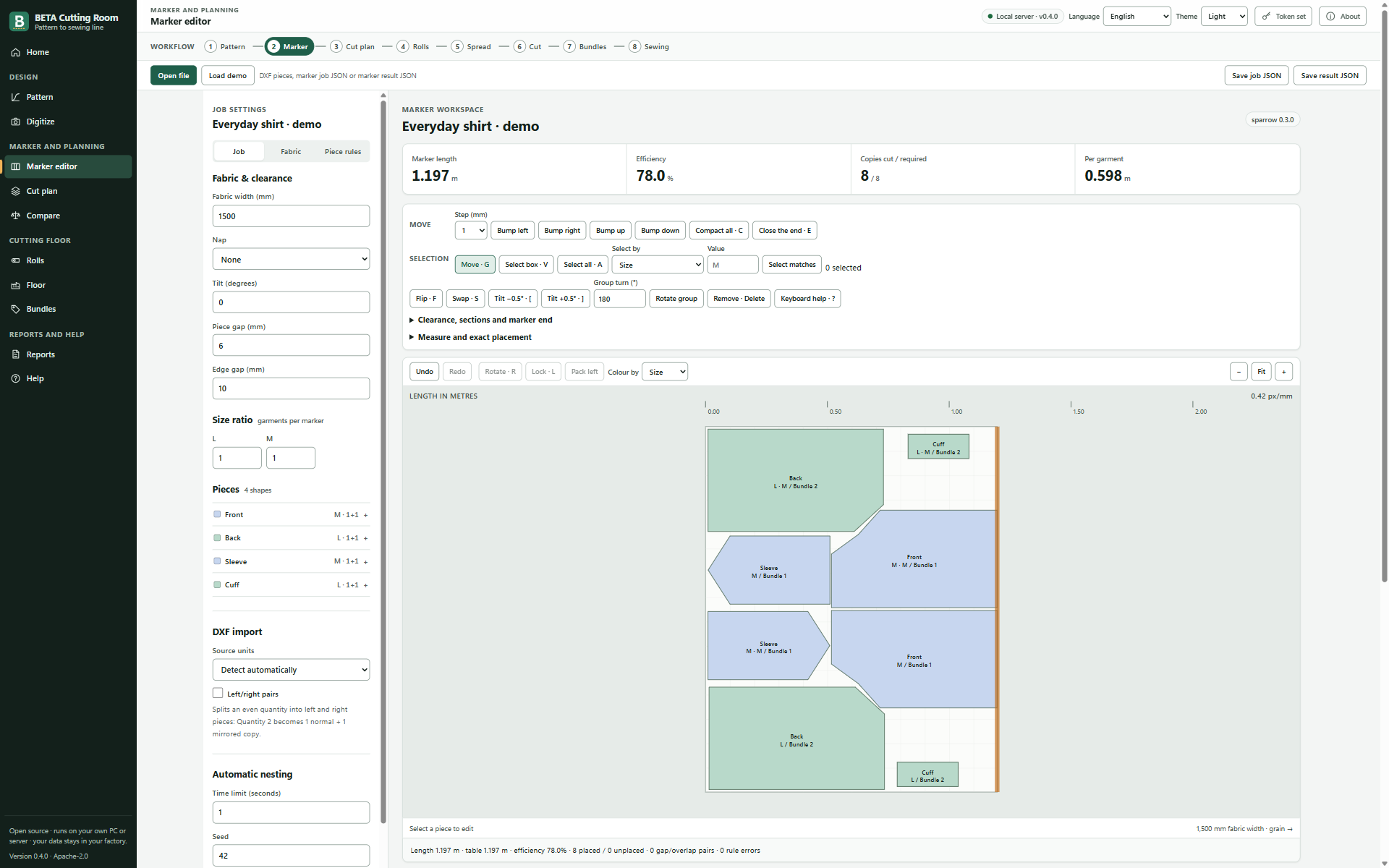
Screenshot of the Marker editor screen in BETA Cutting Room
Marker editor: nest, bump, compact and check every piece.
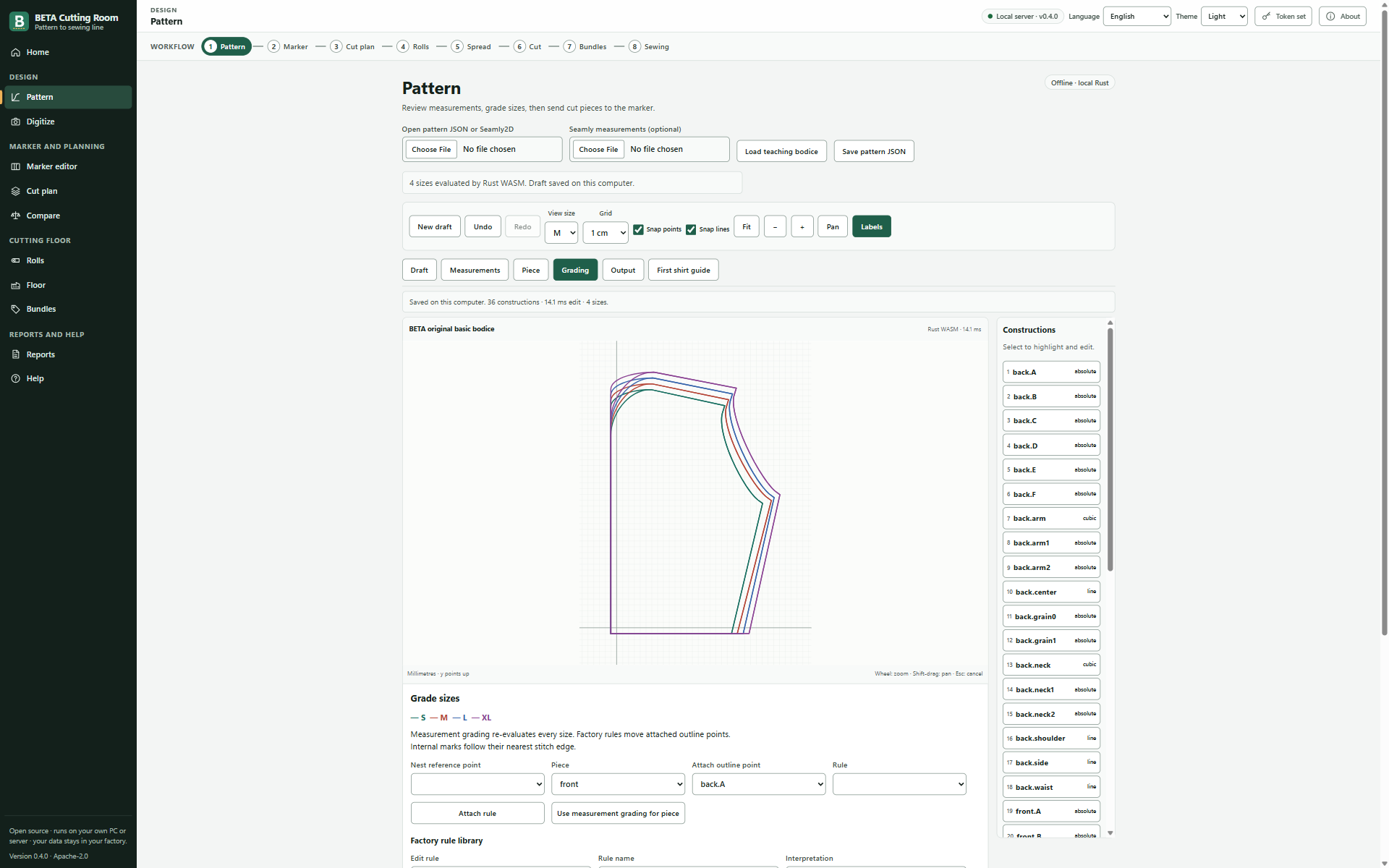
Screenshot of the Pattern screen in BETA Cutting Room
Pattern: draft, grade and check all sizes.
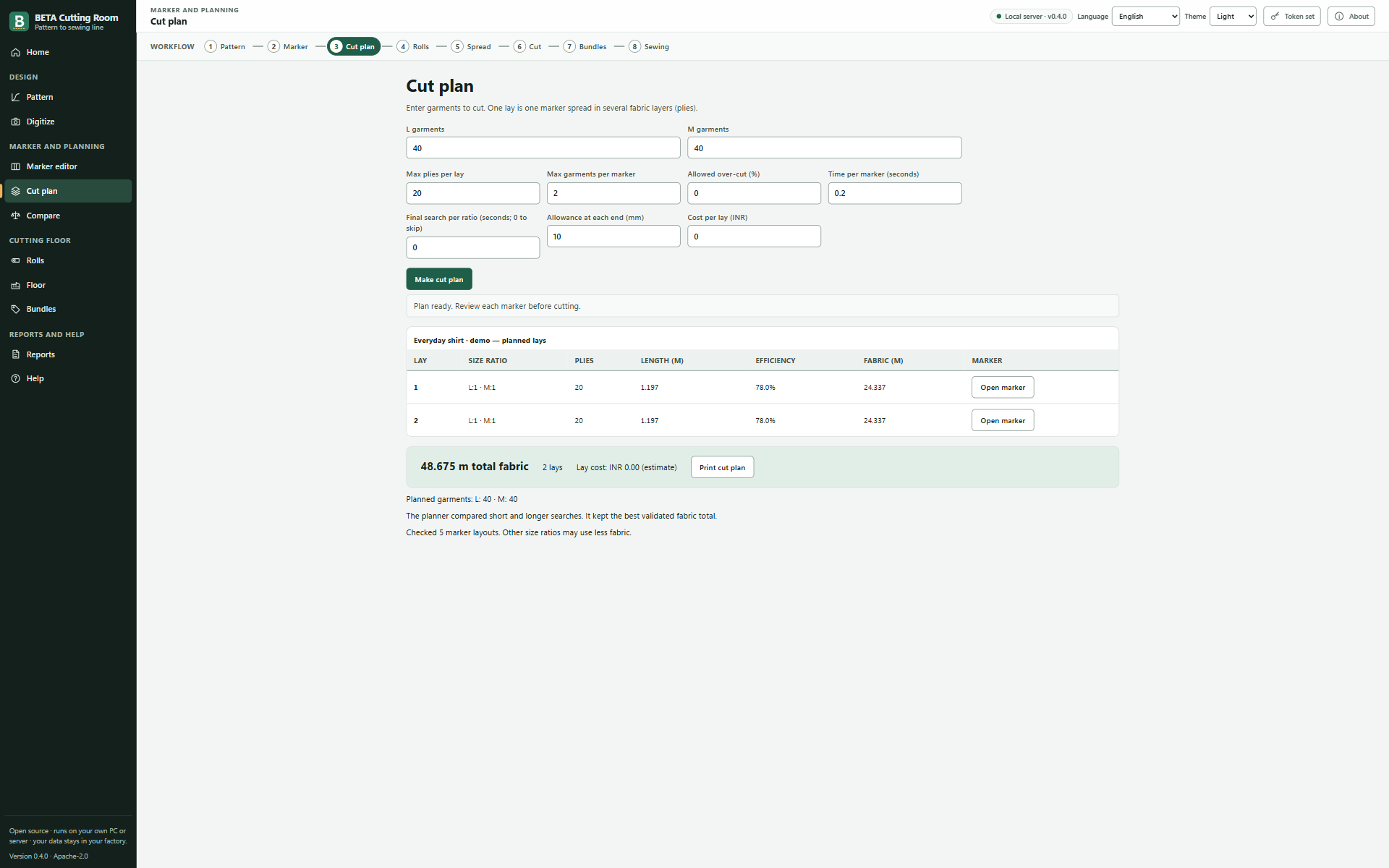
Screenshot of the Cut plan screen in BETA Cutting Room
Cut plan: ratios, plies and lay lengths for an order.
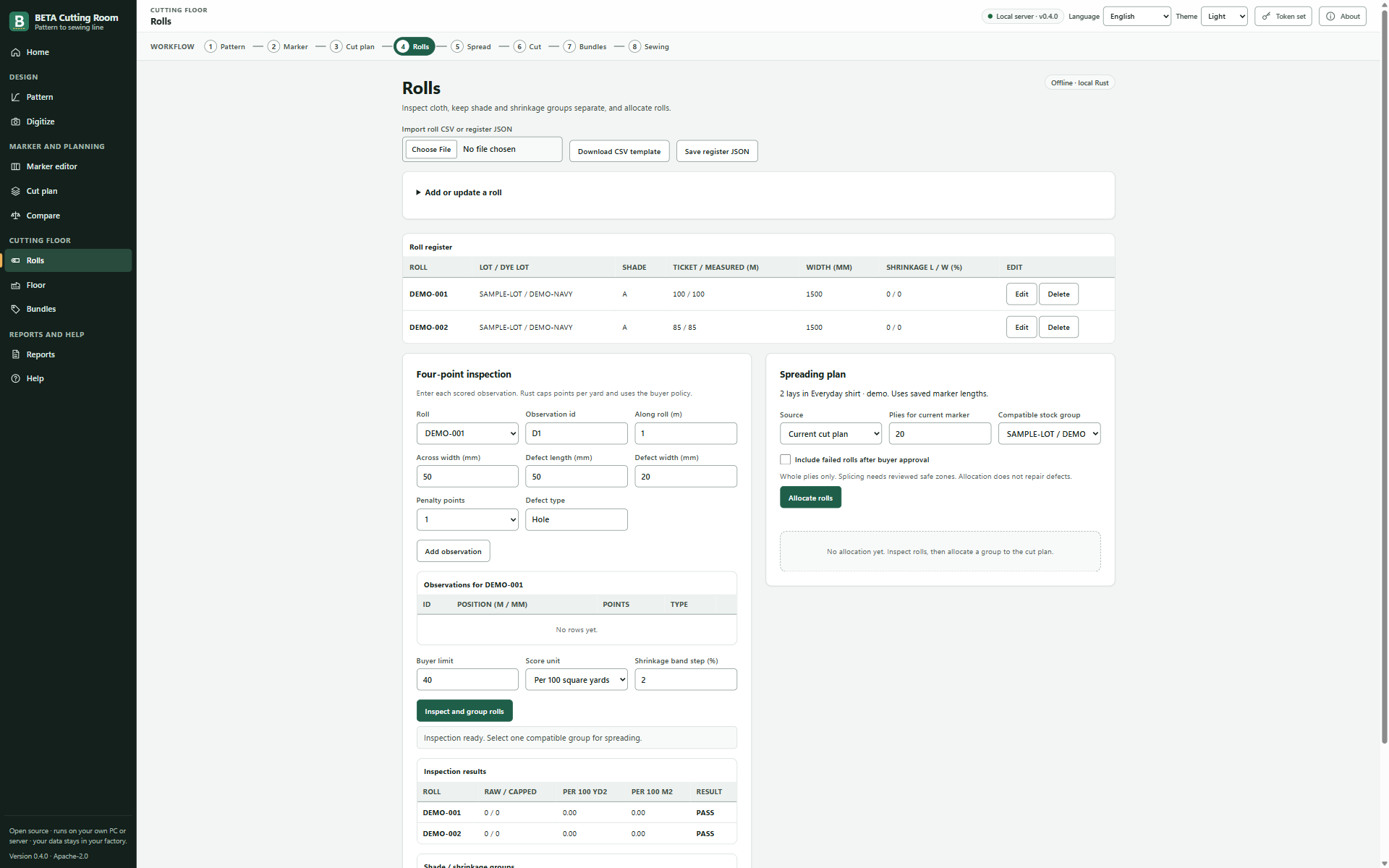
Screenshot of the Rolls screen in BETA Cutting Room
Rolls: inspection, shade groups and allocation.
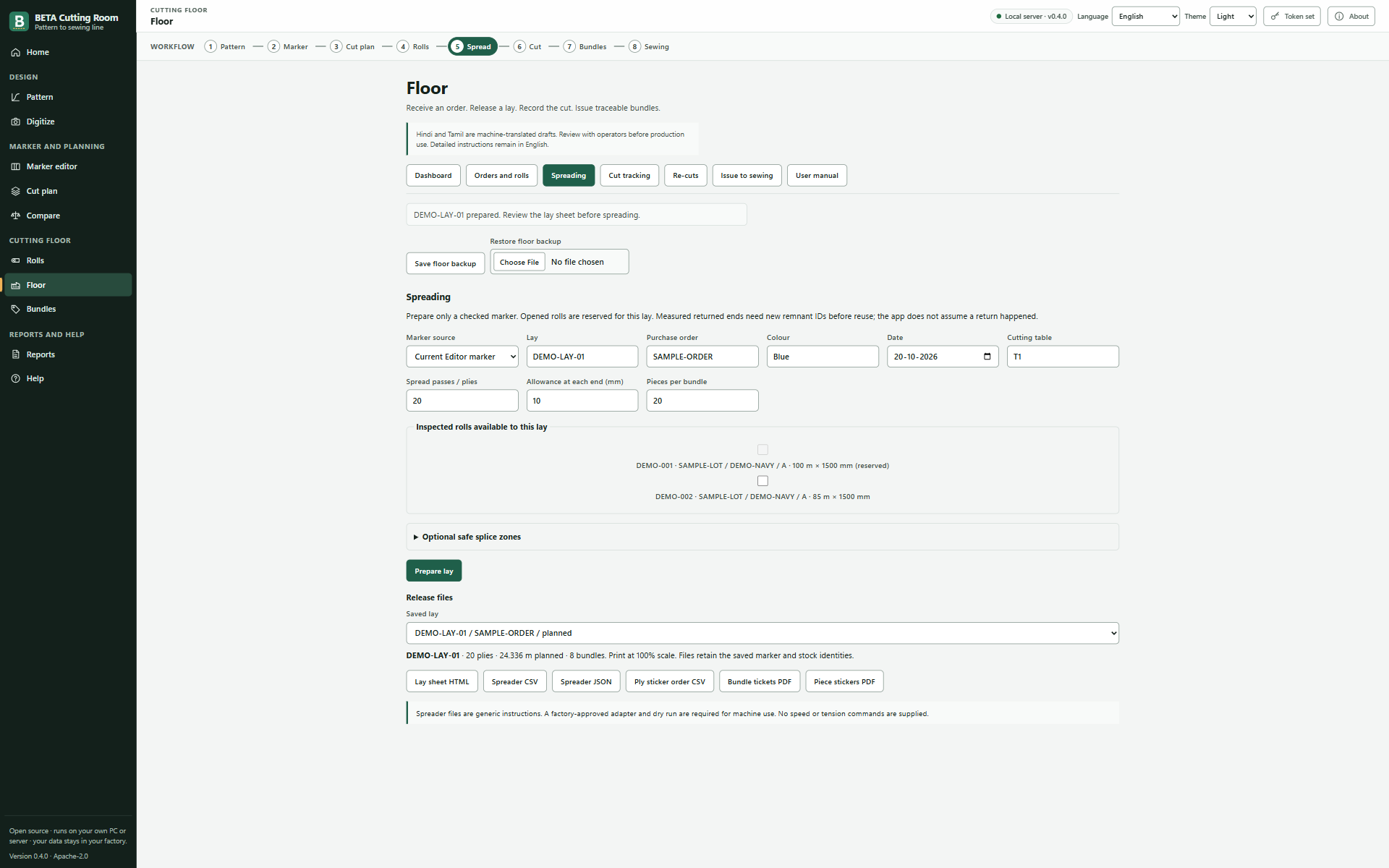
Screenshot of the Spreading screen in BETA Cutting Room
Floor: spreading sheets and lay tracking.
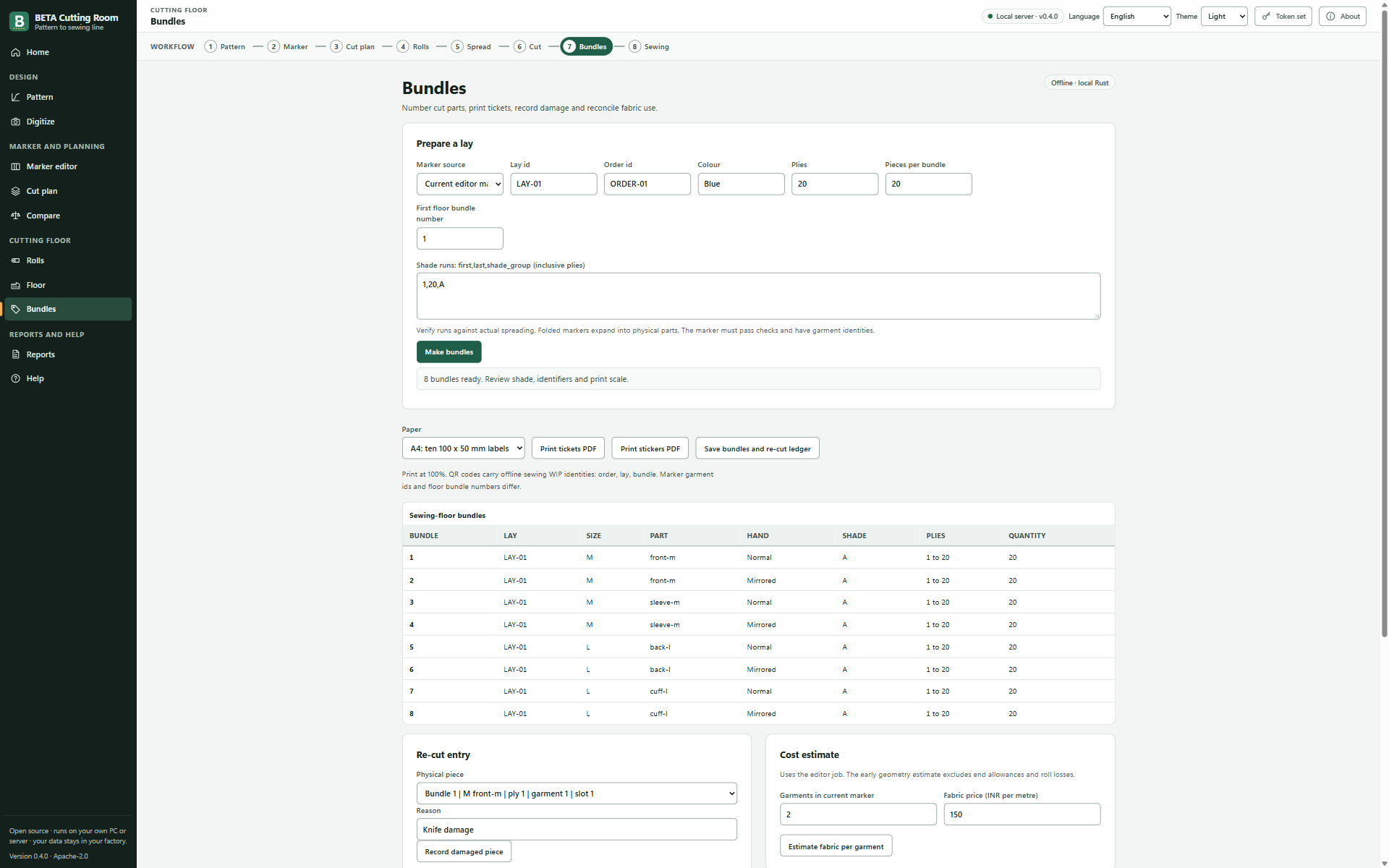
Screenshot of the Bundles screen in BETA Cutting Room
Bundles: QR tickets, stickers and re-cuts.

Real screens from version 0.4.0, with original sample data. No factory data.

Public benchmark

Honest numbers, not big claims

We test BETA on the public Lectra dataset: real nesting tasks from fashion companies, with the efficiency that Lectra’s own engine reached on each one.

With Lectra’s own time per task

About 5 minutes per task · 60 tasks

+0.42 ppMean difference
−0.30 ppMedian task

25 wins3 ties32 losses

60 of 60 BETA layouts passed the independent validator. A tie is within 0.1 points.

With 60 seconds per task

300 tasks

−0.73 ppMean difference
−1.22 ppMedian task

84 wins12 ties204 losses

300 of 300 BETA layouts passed the independent validator. A tie is within 0.1 points.

No general win over Lectra. BETA is close to Lectra’s recorded results, but it still loses more tasks than it wins. We publish every number so you can check. Points (pp) are BETA’s marker efficiency minus Lectra’s; below zero means BETA’s marker was longer.

Method, assumptions and all results

Features

What it does today

Each of these runs on your own computer. The heavy work (nesting, checks, file output) is written in Rust for speed.

Pattern making

  • Drafting with measurements and formulas
  • Grading and size checks
  • Digitize a paper pattern from a photo
  • DXF-AAMA export; Seamly2D file subset import

Marker making

  • Automatic nesting with garment rules: grain, one-way nap, left/right pairs, size ratio, gaps
  • Folded and tubular fabric, shade bands, fabric defects
  • Manual editing: bump, compact, swap, sections, marker library
  • Every marker is checked by an independent validator before export

Cut planning and costing

  • Size ratios, ply heights and lay lengths from an order
  • Fabric consumption and cost estimates
  • Compare fabric widths (command line)

Rolls and spreading

  • 4-point roll inspection and defect maps
  • Shade and shrinkage groups
  • Roll allocation, splice zones and end bits

Bundles and the floor

  • Ply numbering, bundles, QR tickets and stickers
  • Re-cut planning for damaged parts
  • Bundle scan-out to sewing lines with a USB scanner

Files and data

  • Plot: PLT/HPGL and 1:1 PDF; SVG, DXF, generic ISO cutter file
  • Import orders and rolls from CSV or Excel
  • Export consumption and work-in-progress as CSV

Not yet

We prefer to tell you before you find out.

  • Plotter and cutter profiles are generic. Test them on your machines before production.
  • Folded and tubular fabric work, but results are weaker than on open fabric.
  • No direct Tally or SAP connector yet. Exchange data with CSV or Excel files.
  • The server mode serves one computer in version 0.4. Shared use over the factory network is planned.
  • The Windows installer is not code-signed yet. Windows may show a warning.
  • English only. Hindi and Tamil are planned.

Privacy

Your data stays in your factory

BETA runs on computers you control. There is no BETA cloud to send your patterns to.

  • Patterns, markers, orders and roll data stay on your PCs and your server.
  • No account, no tracking, no usage data and no crash reports sent anywhere.
  • Works with no internet. Install and update from a USB drive.
  • The server listens only on its own computer unless you turn on factory network access with a token.

Read about privacy and self-hosting

Diagram: inside your factory, a PC, a server and a plotter share data. There is no link to a cloud service. Your factory PC Server Plotter Cloud

Who it is for

Garment factories

Cutting rooms that want control of their own data and no per-seat licence fees. First users are in India.

CAD and marker operators

People who make markers every day and need grain, nap, pairs, ratios, folds and shade rules to be right.

Merchandisers and planners

Fabric consumption, width comparison and cut plans from the same marker the cutting room uses.

Factory IT

A Windows installer, a command-line server and plain files. No cloud service to approve.

Researchers and developers

Open code, open benchmark and open data formats. Improve the nesting engine and prove it.

Download

Portable ZIP

No installation. Unzip, run start-server.cmd and open the app in your browser. 8.42 MiB.

Download ZIP

Portable steps

Linux server

The beta-marker serve command runs the same app in a web browser. 7.92 MiB. Needs glibc 2.43 or newer.

Download server

Server steps

A fun project

Built for fun, with the help of modern AI tools

BETA Cutting Room is a fun project by a small team. We build it with the help of modern AI coding assistants, and we test it like serious software: an independent validator checks every marker before you can export it.

The code is open. You are welcome to read it, try it and help us make it better.

See the code on GitHub (external site)

Send us your markers

We want to compare BETA with your current CAD on your own styles: same pieces, same fabric width, same rules. You get the results, and they stay private.

What to send

  1. 3 to 5 real styles exported as DXF-AAMA or ASTM from your CAD (for example a shirt, trouser, T-shirt or jeans).
  2. For each style, the marker your CAD made: fabric width, size ratio, rules (nap, 0/180, gaps), marker length and efficiency, and how long the auto-nest ran.
  3. If you can, one plotter file (PLT) from your cutting room, so we can check the plot scale on your plotter.